Miner onboarding
Wallet & registration
Everything about keys, TAO and registration for people who have never used Bittensor. Two paths: Talisman in Chrome for beginners, btcli in a terminal for experienced users. Both end with a registered hotkey file on your GPU server.
Status · checked 5 October 2026
REAX is launching soon and has no netuid yet; <NETUID> is announced at launch. The wallet steps work today on any Bittensor network. Commands use btcli from bittensor 11.1.0, the current official command line tool. Wallet apps change their screens from time to time; the screenshots below are from Talisman 3.10.1.
Coldkey and hotkey
| Coldkey | Hotkey | |
|---|---|---|
| Think of it as | your bank account | your miner's ID badge |
| Does | holds TAO, pays the registration fee, owns your miner's stake, can move funds | gets the UID (slot) on the subnet, signs every answer, publishes the miner's address and commitment |
| Lives | in Talisman, a hardware wallet, or an encrypted btcli file on a trusted computer | as a file on the GPU server: ~/.bittensor/wallets/<wallet>/hotkeys/<hotkey> |
| If it leaks | the thief can take your TAO and stake. Move funds to a new wallet immediately | someone can impersonate your miner but cannot spend TAO. Swap it: btcli tx swap-hotkey |
| Never | copy it to a server, type its phrase into a website, chat or form | commit it to git or share the server with untrusted users |
Both keys have an address starting with 5. Addresses are public and safe to share. The recovery phrase (12 or 24 words) is the key itself: whoever has it controls the account. Nobody legitimate, including REAX, Talisman, an exchange or "support" in a Discord DM, will ever ask for it.
The REAX miner reads only the hotkey file. It does not need your coldkey, and you should never give it one.
Which wallet?
| Wallet | Good for | Can it register a miner? |
|---|---|---|
| Talisman (Chrome, Firefox, Brave extension) | beginners; holding, sending and staking TAO; Ledger support | yes, through reax.dev/register (recommended below) |
| Polkadot.js extension, SubWallet | same role as Talisman | yes, through reax.dev/register |
| Nova Wallet, TAO.com app (mobile) | holding and staking TAO on your phone | not that we found: no subnet registration feature |
| btcli (official command line tool) | experienced users, automation, Ledger and Polkadot Vault signing | yes, directly |
| Ledger hardware wallet | the safest place for a coldkey | yes, through Talisman (Ledger account) on the registration page, or btcli --ledger |
No browser wallet creates the hotkey file the miner needs, so one short btcli step on the server is always required. Everything that involves money stays in your browser wallet.
Beginner path: Talisman in Chrome
Tested on 5 October 2026 with Talisman 3.10.1 in Chromium; the screenshots below are from that test (a throwaway test account).
1. Install Talisman and set a password
- Open
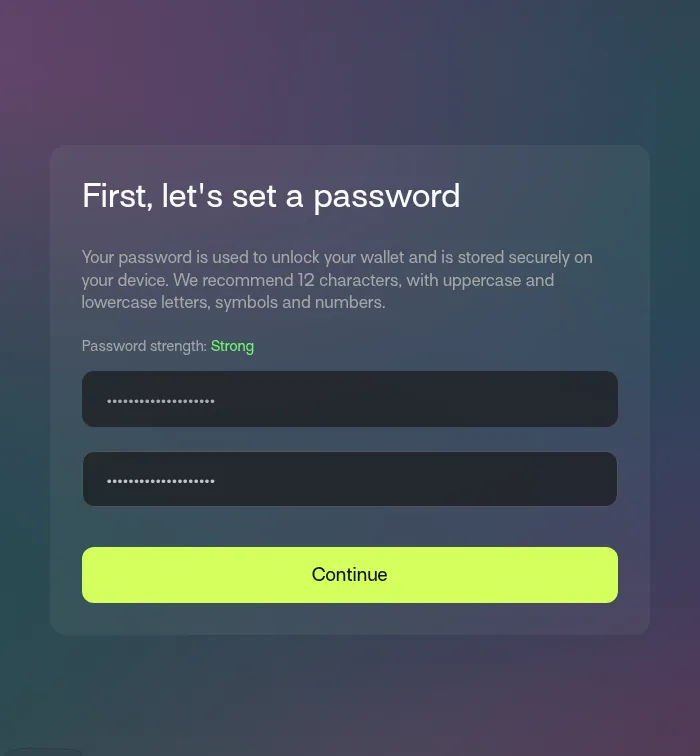
talisman.xyzin Chrome and click Download. It takes you to the Chrome Web Store. Check that the publisher is Talisman before you click Add to Chrome: fake wallet extensions with similar names exist. Pin it: puzzle icon in the toolbar, then the pin next to Talisman. - Talisman opens a welcome page. Click Get Started, enter a strong password twice and click Continue. The password only unlocks Talisman on this computer; it is not your recovery phrase.
- Choose whether to share anonymous usage data (No thanks is fine), then Enter Talisman.
2. Create a Substrate account (your coldkey)
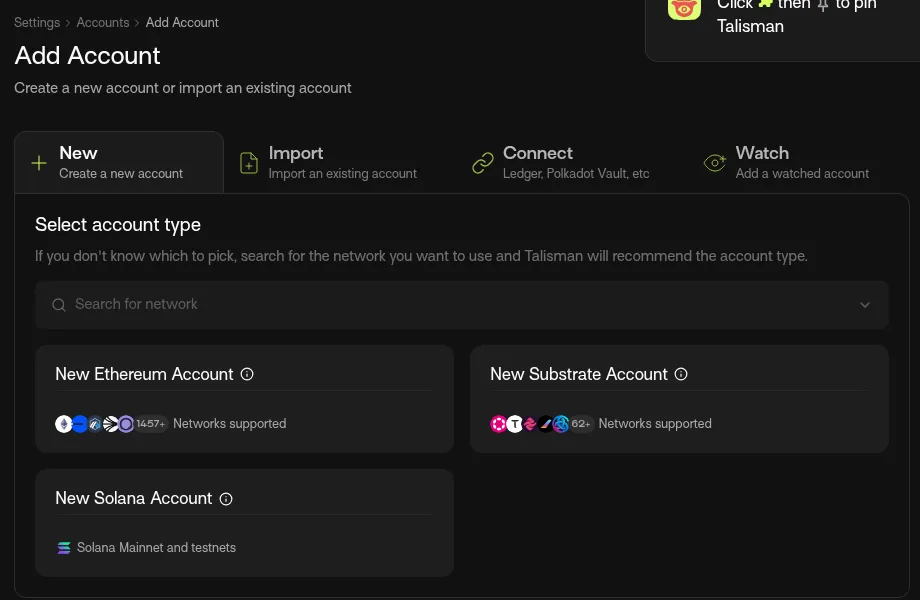
- On the Portfolio page click Add account (later: Settings → Manage Accounts → Add). Stay on the New tab and choose New Substrate Account, not Ethereum: Bittensor is built on Substrate, the same technology as Polkadot.
- Name it, for example
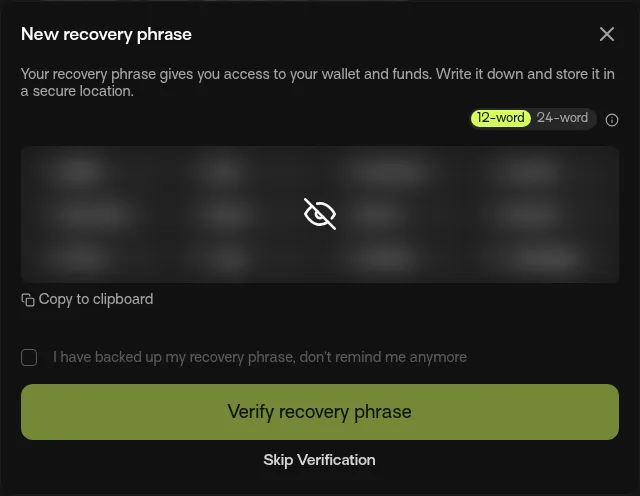
reax-coldkey, and click Create. Leave "Advanced" (custom derivation path) empty. - Read the warning and click Acknowledge and Continue. Click the eye icon to reveal the 12 words. Write them on paper, in order, and keep the paper safe; a second copy in another place is wise. No photo, no cloud, no e-mail, no chat.
- Click Verify recovery phrase and complete the check. (If you chose "Skip Verification", Talisman reminds you later under Settings → Recovery Phrases.)
3. Copy your Bittensor address
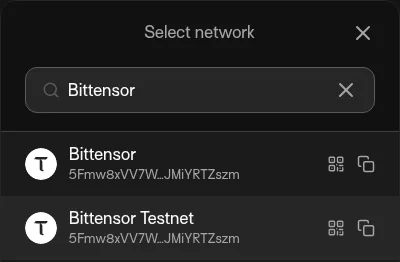
Click Receive, type Bittensor in the search box and click the copy icon next to Bittensor (not "Bittensor Testnet"). The address starts with 5. This is where you receive TAO. Always paste it, never retype it.
4. Put TAO on it
See Buying TAO below. Talisman shows the balance once the transfer arrives.
5. Register the hotkey on reax.dev/register
- On the server, create the hotkey (step 4 of the guide):
btcli wallet new-hotkey -w reax -H miner1, and write its recovery phrase down too.btcli wallet listshows its address underminer1. - Open reax.dev/register in Chrome on your laptop, click Connect Talisman and allow your
reax-coldkeyaccount (click the account so its dot turns green, then Connect 1). - Paste the hotkey address, click Check fee and status, tick the confirmation and click Register hotkey.
- Talisman shows Approve Request with
SubtensorModule: register_limit. Under View Details checknetuid,hotkeyandlimit_price(the price cap) against the page, then click Approve. The page shows your UID.
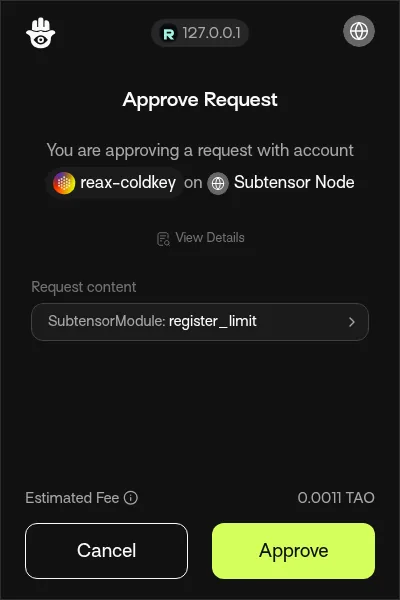
register_limit with your netuid, hotkey and price cap.Why a web page and not btcli?
btcli 11.1.0 can let a browser wallet sign most transactions (--signer extension), but not registration: it insists on sending registrations "MEV-shielded" (encrypted until included), which it cannot combine with an extension signer (error: MEV shielding cannot wrap the extension signer). The registration page instead sends register_limit with a price cap 10 % above the price it shows you, so a sudden price jump cannot make you pay more than that. If a subnet locks part of the fee as collateral, the page refuses and points you to btcli.
Experienced path: btcli only
Create the wallet on a trusted computer that is not the GPU server, register from there, and copy only the hotkey file to the server.
python3 -m venv ~/btcli-venv && ~/btcli-venv/bin/pip install "bittensor==11.1.0" "typer<0.27.2"
alias btcli=~/btcli-venv/bin/btcli

btcli wallet create -w reax -H miner1        # coldkey (encrypted with a password) + hotkey; note both phrases
btcli wallet balance -w reax                 # after funding the coldkey address
btcli subnets burn-cost <NETUID>
btcli tx burned-register --netuid <NETUID> -w reax -H miner1 --dry-run
btcli tx burned-register --netuid <NETUID> -w reax -H miner1

# copy ONLY the hotkey to the server
ssh you@your-server 'mkdir -p ~/.bittensor/wallets/reax/hotkeys && chmod 700 ~/.bittensor/wallets'
scp ~/.bittensor/wallets/reax/hotkeys/miner1 you@your-server:~/.bittensor/wallets/reax/hotkeys/
ssh you@your-server 'chmod 600 ~/.bittensor/wallets/reax/hotkeys/miner1'
Hardware wallet: add --ledger (Polkadot generic app) or --signer vault (Polkadot Vault via QR) to any btcli tx command. Older guides use the btcli 9 spelling (btcli subnets register --wallet.name …); btcli 11 still accepts many old names, but the commands on this page are the current ones.
Buying TAO
- Pick an exchange that lists TAO and accepts customers from your country. On 5 October 2026 TAO was listed, among others, on Kraken (also against EUR), Coinbase, Binance, KuCoin, Gate, Bitget and MEXC. Listings and country rules change; first-time identity checks can take a while.
- Buy the amount you need for registration plus a margin. We do not comment on prices.
- Withdraw to your coldkey address. Select the network Bittensor or TAO. Never pick ERC-20, BEP-20 or any "wrapped" TAO. Paste the
5…address, then compare every character. - Test first. Send a small amount, wait until your wallet shows it, then send the rest. Exchanges have minimum withdrawals and a fee.
- Send TAO only to a coldkey address, never to a hotkey address.
Watch out for "address poisoning": scammers send tiny amounts from look-alike addresses so that one appears in your history. Always copy the address from Talisman, never from your transaction history.
How the registration fee works
- Registration is a burn: the TAO is destroyed (recycled), not paid to anyone and not refundable.
- Each subnet has one floating price. It goes up after every registration and slowly falls back while nobody registers, within a minimum and maximum the subnet sets. On a quiet subnet it can be very low; right after a launch, when many people register, it can be much higher.
- Read it right before you register:
btcli subnets burn-cost <NETUID>. btcli shows the fee again in the transaction summary, and the amount actually charged is the price when the transaction lands. - After registering, a new miner has an immunity period; check it with
btcli query immunity-period --netuid <NETUID>. When the subnet is full, each new registration replaces the lowest-ranked miner that is no longer immune. If that is you, you need to register (and pay) again.
Where earnings go
On Bittensor today each subnet has its own token called alpha. Miner rewards arrive as alpha staked on your hotkey, owned by the coldkey that registered it. See them in Talisman (Portfolio and Earn), or with btcli stake list / btcli wallet overview -w reax on the machine that holds your btcli coldkey. (On the GPU server, which has only the hotkey, wallet overview fails because there is no coldkey file; that is expected.) To turn alpha into TAO you unstake it, which swaps it through the subnet's pool at the current rate, with a fee; preview first with --dry-run. REAX makes no statement about the amount or value of any reward.
Safety checklist
- Recovery phrases only on paper (or a metal backup), never typed into a website, chat, form, cloud document or AI assistant.
- Nobody from REAX will DM you first, ask for a phrase, or ask you to "validate" or "sync" your wallet. Ask for help only in public channels.
- Install wallets only from links on their official sites. Check the publisher.
- The GPU server holds only the hotkey (
chmod 600). Never copy a coldkey file or phrase to it. - Pin software versions (
bittensor==11.1.0) and install only from official sources. A compromised Bittensor package once stole keys (2024). - Larger balances belong on a hardware wallet (Ledger works with Talisman and btcli).
Sources
Checked 5 October 2026: Bittensor documentation at bittensor.com/docs (wallets, mining, registration burn, signing with a browser extension, Ledger, local development, migration from btcli 9), Talisman documentation at docs.talisman.xyz (creating a Bittensor account, backup, copying addresses), and the public APIs of the exchanges named above. Wallet apps and exchange listings change; check the current state yourself.
Next: run the miner · FAQ & troubleshooting